Name your Nostr identities and choose a custom path
Use optional identity names, advanced derivation paths and public-key previews in Nostr WoT. Learn what to keep for recovery.

A work identity, a project identity and a testing identity do not have to look identical in your account list. Nostr WoT lets you give a new seed-derived identity a useful local name and, under Advanced, choose the derivation path yourself. Leave the path alone if the automatic choice suits you.
A name and a path do different jobs
| Setting | What it changes |
|---|---|
| Account name | A local label that helps you recognize the identity. It is optional and does not change the key or publish a profile name. |
| Derivation path | The route used to derive a key from your existing seed. A different path normally produces a different identity. |
| npub and hex preview | Two representations of the resulting public key, shown before you save. |
Create the identity
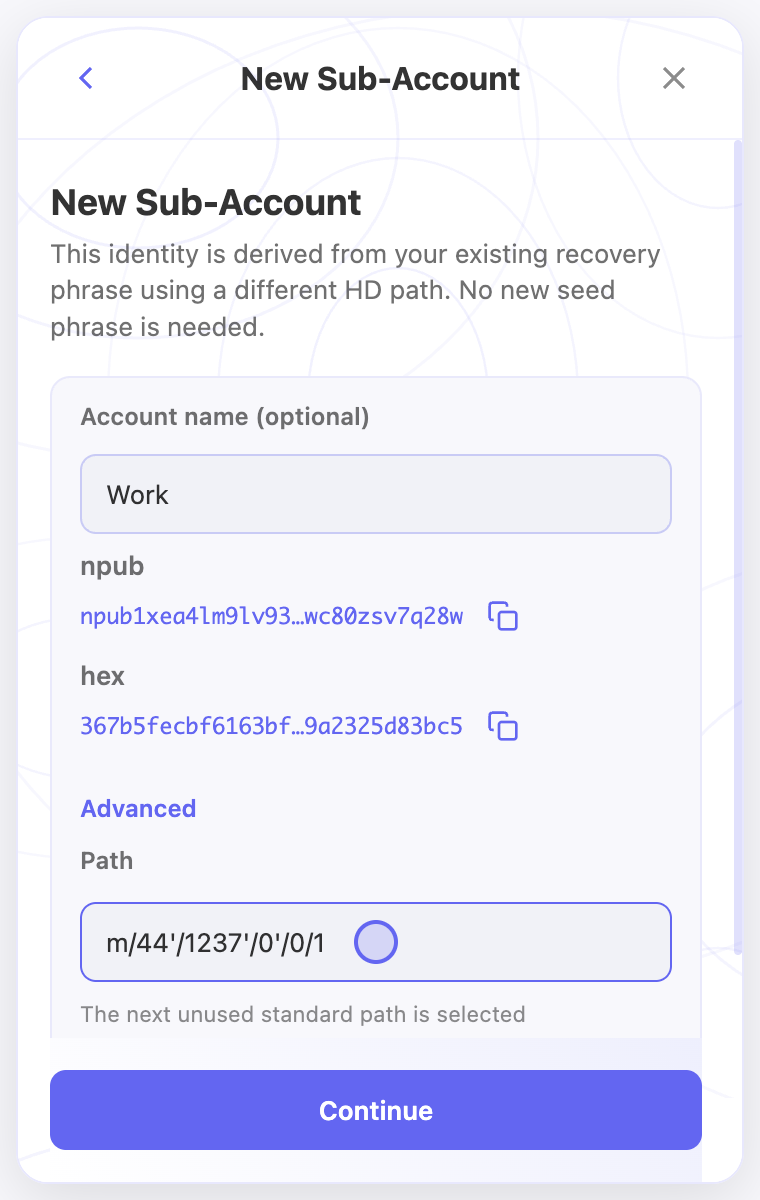
- Unlock the extension and open the account selector. Start adding an account and choose HD Sub-Account. This requires an existing recovery phrase in the vault; an imported nsec alone is not that phrase.
- The extension proposes the next unused path from your main recovery phrase. The relationship is explained below the form; there is no separate source-seed row.
- Optionally enter a name such as “Project” or “Testing”. Leaving it blank keeps the proposed name.
- Open Advanced only if you need a specific path. Enter the exact path and wait for the public-key preview to refresh.
- Check both the path and the displayed npub. An invalid path, failed preview or preview still loading prevents continuation.
- Select Continue to save the identity in the vault. Editing the preview alone does not save an account.
What does a path look like?
The initial Nostr path is m/44'/1237'/0'/0/0. An example later path in the extension’s sequence is m/44'/1237'/0'/0/1. These are paths, not private keys. Keep every slash, number and apostrophe when recording yours.
For recovery in another tool, never assume its account counter follows the same sequence. NIP-06 describes incrementing the hardened account component; the extension’s existing additional-account sequence increments the final component. Matching the exact path and public key matters more than matching an account number. NIP-06 is currently marked optional and unrecommended by its maintainers, so support across clients is not guaranteed.
Recognized network-prefix hints describe a convention only. Choosing a Bitcoin-looking path still creates a Nostr identity, not a Bitcoin wallet. Avoid reusing a path already used by a wallet.
Keep recovery practical
Store your recovery phrase securely, together with the exact path and the public npub you expect to recover. A local name is useful for organization but cannot restore a key. A seed alone does not tell another application which custom path you selected.
Different paths are useful for organizing identities, not for isolating them from compromise of their shared seed. They do not guarantee anonymity either. Changing the path does not transfer posts, followers or profile information to the new identity. Existing keys are not changed by this feature.
Start with identity management if you only need account switching. Use custom paths when you have a recovery or organization requirement you can document.
Account previews and finishing setup
When a main recovery phrase already exists, Create New opens New Sub-Account. It uses that phrase with another derivation path; it does not generate a second recovery phrase. Edit the name if needed. The npub and hex public keys appear below their labels in accent color, shortened in the middle. Copy icons copy the complete values. Advanced sits below the keys and opens the path editor; leave the proposed path unless you need a specific one.
Follow suggestions show names and small pictures from verified public profiles when available. The extension reuses a shared cache for 30 minutes, keeping at most 500 profiles, and looks up missing metadata at purplepag.es. The public author key is sent to that directory; images load separately from the profile's image host. Missing profiles fall back to a shortened key. Loading does not block selection or Skip for now.
The completion screen puts the account summary and Get Started at the bottom. It shows the account name and a copyable public key; only derived sub-accounts are described as sharing the main seed phrase. New accounts can use global rules or copy site overrides from another account. Authentication grants stay separate.
In the extension
Screenshots use the English interface and demo accounts. Open an image to see it at full size.
Related video walkthroughs
These videos are in English.